GTCFX: plan EA capacity around the 300-order limit
Count open positions and pending orders together; the published ceiling may be reduced.
A broad claim does not remove the order cap
Account Types combines a broad no-restrictions claim with a standard 300 active-order ceiling covering positions and pending orders. The notice allows risk-based reductions and blocks new orders above the limit. An EA therefore needs queue management even when its strategy is permitted.
Sources for this section
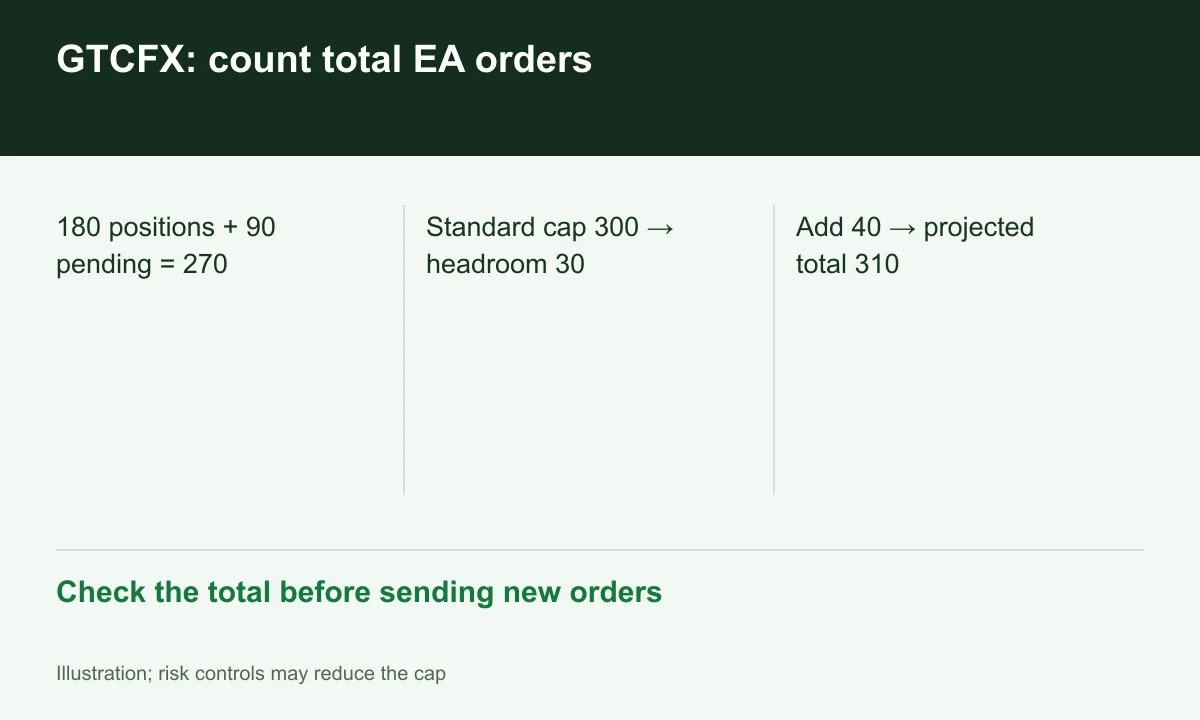
Diagram explained
Check the total before sending new orders
- 180 positions + 90 pending = 270
- Standard cap 300 → headroom 30
- Add 40 → projected total 310
Count the account total, not each symbol
With 180 positions and 90 pending orders, the total is 270 and standard-cap headroom is 30. Adding 40 pending orders would target 310. Rejection should not serve as the strategy’s risk control; the algorithm should check totals before sending.
Sources for this section
Choose the terminal and inspect rejection handling
Open Live Account lists MT4/MT5 for Standard and ECN. Multiple symbols or EAs on one account need an aggregate count, rejection logging and bounded retries. This is a proposed validation design, not a FINEX report of running bots at GTCFX.
Sources for this section
Use the assigned account’s current limit
Because limits may be reduced, the example’s 30-order buffer does not guarantee acceptance of 30 further orders. Confirm entity, current capacity and contractual risk controls. The website Terms expressly defer financial services to the separate account documents.
Sources for this section
Official gtc-markets source Official gtc-markets source Official gtc-markets source
Register for up to 100% trading fee rebates
Rebate details
Contact FINEX to confirm the rebate rate, eligible fees and account conditions before registering. contact@finexbroker.com
Your next step
Sources and scope
Sources are provider publications. Conditions may vary by entity, country, account and program. Recheck before signing up.